

Yay! We're the merit winner of APICTA 2022

Fix It Before the Guest Finds It
Softinn Task turns every reported issue into a tracked work order — raised in seconds from any phone, visible to the whole team, and closed off with a record of what was done.
The Challenges Maintenance Teams Face
Running hotel maintenance is tough when:
Issues get reported by WhatsApp, walkie-talkie and sticky notes — so some never reach the technician at all.
01
Nobody knows what’s outstanding. The chief engineer keeps the list in their head, and it walks out the door on their day off.
02

03
A room with a broken aircon gets sold anyway, because the block never made it into the PMS.
04
Front desk keeps chasing maintenance for status updates, and maintenance keeps stopping work to answer.
05
The same room breaks every month, but nobody can prove it — so it gets patched again instead of properly fixed.

How Softinn Helps You Win
Anyone Can Report, In Seconds
A housekeeper finds a leaking tap mid-clean. They log it from their phone, in the room, with the location already filled in. The work order is in the maintenance list before they’ve finished the bathroom.
One Tracking List for the Whole Department
Every open job in one place, with status, assignee and completion date. Your technicians know what’s next; your manager knows what’s outstanding — without a single status-update call.
Block the Room at the Same Time
Choose to close the room while raising the work order, and it stops being sellable straight away. No separate step, no room sold with a dead aircon in it.
See What Keeps Breaking
The room maintenance summary shows room status and recurring issues per room — so you can stop repeating the same repair and start planning the replacement.

Meet Task — Built for the Technician on the Move
Your technician’s day is a ladder, a toolbox and a walk between floors — not a desk. Task is a mobile-first module built for that: every assigned job, its full history and its photos on one screen, updated from the phone in their pocket.
Task is live at task.mysoftinn.com and runs in any smartphone browser — no app to install, no special hardware.
What Your Team Can Do with Task
Everything maintenance needs to take a job from reported to resolved — without walking back to the office.
Raise a work order in seconds
“Create Maintenance Task” is one button away for front desk, housekeepers and inspectors. Pick the room or area, describe the issue, done. The people who find problems are the people who report them.
Report by area, not just by room
Not everything that breaks is inside a guest room. Set up your own areas — lobby, pool, back-of-house corridor, staff quarters — and log work orders against them the same way.
Full job detail on one screen
Open a task and see everything: what was reported, by whom, when, the room or area, the current status and the completion date. No hunting through chat history to find out what was actually said.

Instant notifications when work lands
Technicians are alerted on screen the moment a job is assigned or a status changes — no refreshing, no waiting for someone to walk over and tell them.
Log Lost & Found while you’re there
Found a guest’s charger behind the headboard during a repair? Log it from the phone by picking the location, so it’s recorded properly instead of ending up in a drawer.
Built into the same system as the front desk
Maintenance, housekeeping, inspection and front desk share one Softinn account. Front desk can see a room’s open maintenance issue on the room status page — so nobody assigns a guest to a room that’s mid-repair.
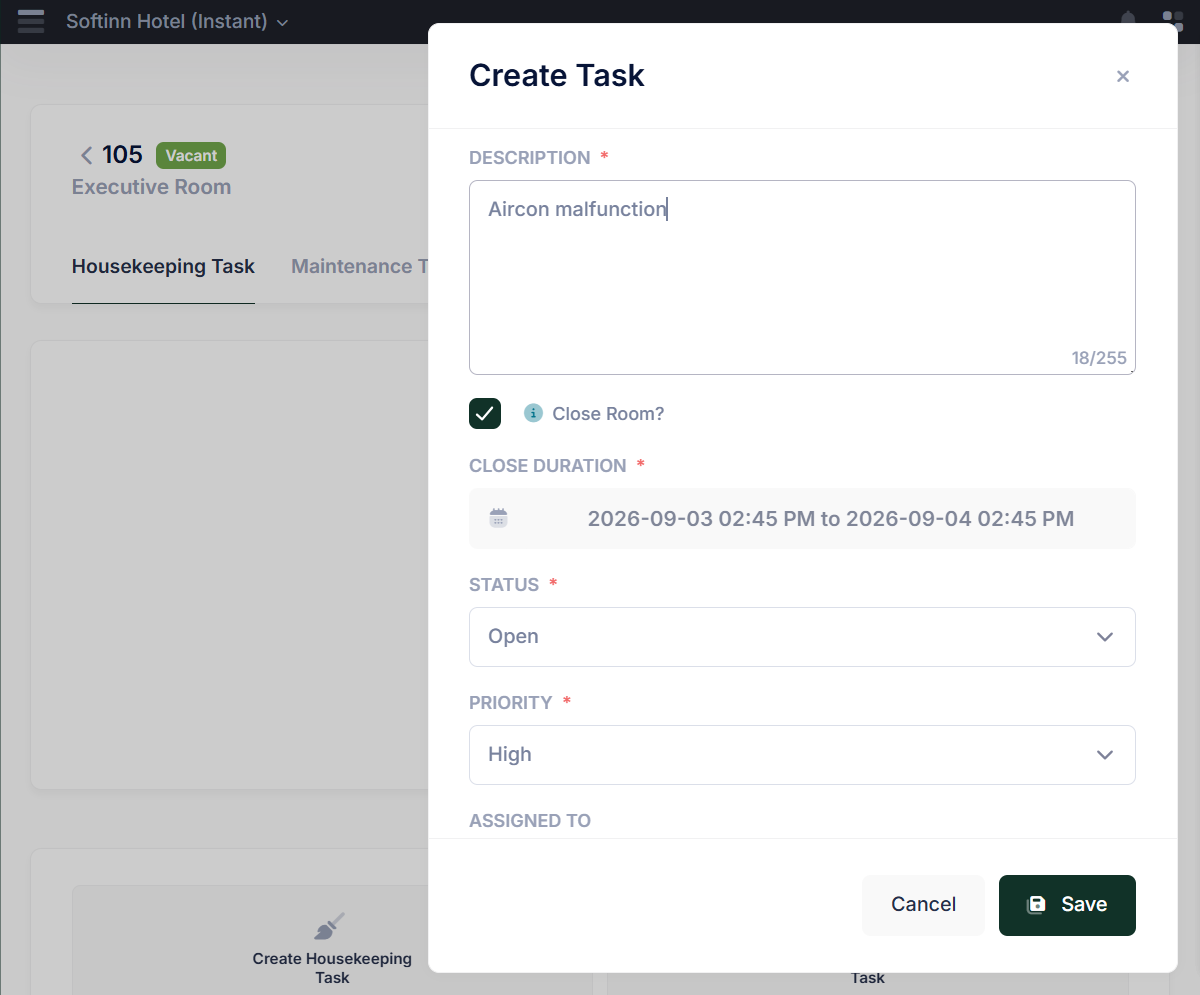
Close the Room While You Raise the Job
The most expensive maintenance failure isn’t the repair — it’s the guest who checks into the room that was never fixed.
When you create a maintenance work order in Task, you can close the room at the same time and set how long it stays closed. The room stops being sellable immediately, across your PMS and every connected channel. When the job’s done and the room reopens, it goes back on sale.
One decision, made by the person who actually saw the problem, at the moment they saw it. No handover, no “did anyone block 302?”, no apology at check-in.
Know What Keeps Breaking, Room by Room
Task gives managers a room maintenance summary — room status alongside the repair history for each room, in a clean layout you can read on screen or export and share.
Patterns show up fast. The corner rooms whose aircon fails every quarter. The wing where the plumbing keeps calling. That’s the difference between fixing the same fault four times a year and budgeting the replacement once.

No audio — silent screen capture. · Recorded on Sep 2026. New features have been added since — start your free trial to explore the latest.
What Other Maintenance Supervisors Say:
💬 "Before this, our repair list lived in a WhatsApp group. Now every job has a record, and I can see what's still open without calling anyone."
— Maintenance Supervisor, a hotel in Melaka
What the Technician Said
💬 "Housekeeping reports it, I get it on my phone with the room number already there. I don't have to go down and ask what's wrong."
— Maintenance Technician, a resort in Langkawi

Want One List for Every Repair in Your Hotel?
Book a Free Demo with Softinn